- Home Page /
- Electronics /
- Computer Accessories /
- Computer Accessories & Peripherals /
- Keyboards, Mice & Accessories /
- Computer Keyboards /
- Laptop Replacement Keyboard US for Lenovo Thi...
0 ratings


Item #:
203756478
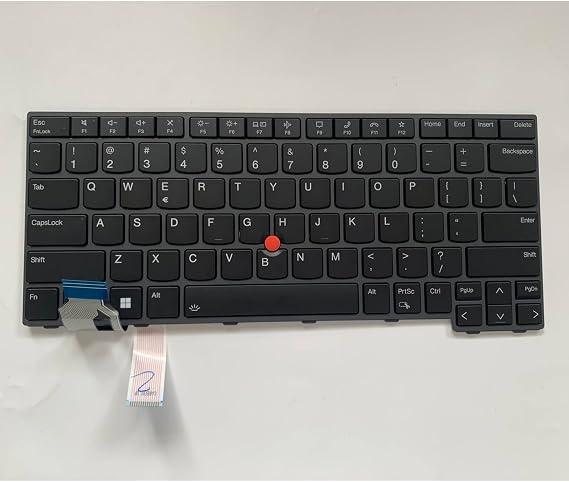
Laptop Replacement Keyboard US for Lenovo Thinkpad L14 Gen 3 T14 Gen 3 P14s Gen 3 TrackPoint,Backlit Black
Item #:
203756478
MVR 675
Price Details
Excluding Shipping & Custom charges ( Shipping and custom charges will be calculated on checkout )
*All items will import from US
0 ratings
Write a review
In stock
 Imported from USA store
QTY:
Order now and get it around Friday, September 25
Secured transaction
Ubuy works hard to protect your security and privacy. Our advanced payment security system ensures confidentiality by encrypting your information during transmission using AES (Advanced Encryption Standards) and SSL (Secure Socket Layer) protocols. Your payment details are 100% secure as we do not share your payment details with third party sellers.
Our Top Logistics Partners


Easy for you to replace your faulty, cracked or broken keyboard.

Fast
Shipping

Free
Return*

Secure Packaging

100% Original Products

PCI DSS Compliance

ISO 27001 Certified



Note: Step Down Voltage Transformer required for using electronics products of US store (110-120). Recommended power converters Buy Now.


What Stands Out
TrackPoint Functionality
Designed specifically for Lenovo ThinkPad models, ensuring seamless integration of the iconic TrackPoint for superior navigation and productivity.
Backlit Keys
Equipped with backlit keys that enhance typing visibility in low-light conditions, offering comfort and convenience for late-night work sessions.
Easy Installation
User-friendly design allows for straightforward installation, making it simple to replace your old keyboard without professional assistance, saving you time and money.
Product Details
| Compatible Devices | Laptop |
| Connectivity Technology | Proprietary Wired |
| Additional Features | Backlit |
| Color | Black |
| Brand | Eobruweo |
| Manufacturer | Eobruweo |
| Special Feature | Backlit |
| Item Weight | 1 lbs (450 grams) |
Who Should Buy?

-
Business Professionals
Ideal for professionals who rely on durable, reliable keyboards for frequent typing and productivity tasks.
-
Students
Perfect for students who need a dependable keyboard for academic work, notes, and assignments in various lighting.
-
Remote Workers
Great choice for remote workers needing a comfortable and efficient typing experience while collaborating online.

-
Casual Users
Casual users may find this specialty keyboard unnecessary compared to regular keyboards with standard features.
Product Description
Laptop Replacement Keyboard US for Lenovo Thinkpad L14 Gen 3 T14 Gen 3 P14s Gen 3 TrackPoint,Backlit Black
Have any Query? Chat with us
Customer Questions & Answers
-
Question:
Is this keyboard compatible with multiple Lenovo models?
Answer: Yes, this replacement keyboard is specifically designed for the Lenovo Thinkpad L14 Gen 3, T14 Gen 3, and P14s Gen 3 models. This ensures a perfect fit and functionality, as all components are engineered to meet the original specifications of these models. If you're using one of these devices, you can confidently replace your old keyboard without worrying about compatibility issues. -
Question:
How does the backlit feature work?
Answer: The backlit feature of this keyboard is designed to provide illumination in low-light environments, making it easier to type in dim settings. Using a soft glow, it enhances visibility without being overly harsh on the eyes. When working late at night or in a dark room, the backlight allows for improved accuracy and comfort while typing, making it a practical choice for professionals and students alike. -
Question:
What tools do I need to install this keyboard?
Answer: To replace your keyboard with this model, you typically need a small screwdriver, such as a Phillips-head, to remove the screws securing the old keyboard. Additionally, a plastic prying tool can be helpful to detach the keyboard without damaging your laptop casing. This straightforward process allows users with basic technical skills to perform a keyboard replacement effectively. -
Question:
What are the benefits of having a TrackPoint on the keyboard?
Answer: The inclusion of a TrackPoint allows for precise cursor control directly from the keyboard, enabling users to navigate without needing an external mouse. This feature is particularly useful in situations where space is limited, such as crowded coffee shops or during travel. It also provides a more efficient workflow, enabling multi-tasking without switching between keyboard and mouse. -
Question:
Can this keyboard replace a non-backlit keyboard?
Answer: Absolutely, this backlit keyboard can serve as a replacement for both backlit and non-backlit models of the same series. Upgrading to a backlit option enhances your typing experience, especially in low light, and improves the overall aesthetics of your device. Whether you often work after hours or simply prefer a modern look, making this upgrade can significantly elevate your work setup. -
Question:
How do I clean the keyboard after installation?
Answer: To maintain the keyboard's functionality and appearance, regularly cleaning it is important. Use a can of compressed air to blow out debris between keys and a microfiber cloth dampened with a mild cleaner for the surface. Avoid using harsh chemicals, as they can damage the finish and backlight. This simple cleaning routine helps ensure that the keyboard remains in excellent condition for longer. -
Question:
Is the keyboard resistant to spills?
Answer: While this keyboard is not specifically labeled as spill-resistant, it is designed to withstand typical usage conditions. However, it's always advisable to handle liquids carefully around electronics. If you frequently work with beverages nearby, using a keyboard cover can provide an additional layer of protection against accidental spills and crumbs, thus prolonging your keyboard's lifespan. -
Question:
Does the keyboard have a specific layout?
Answer: Yes, this replacement keyboard features a US layout, which includes a standard QWERTY configuration along with well-placed function keys and special characters. This layout conforms to the general keyboard configuration familiar to most users, ensuring a seamless transition from your old keyboard to this replacement. It supports a broad range of applications, enhancing user familiarity during tasks. -
Question:
Where can I buy Laptop Replacement Keyboard US For Lenovo Thinkpad L14 Gen 3 T14 Gen 3 P14s Gen 3 TrackPoint,Backlit Black?
Answer: You can conveniently purchase the Laptop Replacement Keyboard US for Lenovo Thinkpad models from Ubuy. Ubuy offers a reliable platform to find and purchase this specific keyboard, ensuring you have access to the product tailored for your device without hassle. Their user-friendly website makes it easy to navigate and secure your new keyboard for a smooth replacement experience. -
Question:
What should I do if the keyboard is not functioning after installation?
Answer: If you find that the keyboard is not functioning after installation, first check your connections to ensure that the keyboard cable is securely attached. Additionally, restart your laptop to see if the issue resolves itself. If problems persist, consult your laptop's user manual for troubleshooting tips or consider seeking professional assistance. Problems could arise from improper installation or issues with the device itself.
Eobruweo Keyboards Editorial Review
No editorial reviews found
Customer Reviews & Ratings
1 customers ratings
-
5 Star
100%
-
4 Star
0%
-
3 Star
0%
-
2 Star
0%
-
1 Star
0%
Review this product
Share your thoughts with other customers
Platform Trust & Buyer Confidence

MA
Mohammad
Verified buyer
“Excellent quality and original too,when ubuy send original things I will appreciate that ,I very satisfied thank you”
23 July 2026 · via Trustpilot
CK
Chitra
Verified buyer
“The order and delivery progress was communicated very well. Package arrived within the estimated time. Products arrived as expected in good condition.”
22-Jul-26 · via Trustpilot
K
kund
Verified buyer
“Good supply of products. Safe payment methods, and shipment worldwide! Genuine products.”
23-Jul-26 · via Trustpilot
OO
Onesi
Verified buyer
“Was my first time buying a product from Ubuy, but I found it so helpful. This is reliable. Gonna place a new order!”
22 July 2026 · via Trustpilot
SJ
SAO JOHN
Verified buyer
“Ubuy is a great online platform to buy stuff. Reliable, fast delivery time and great value for money. I've been using Ubuy online shopping platform for three years now and will continue to do so.”
23 July 2026 · via Trustpilot
Secure Checkout
Global Delivery
Easy Returns
Genuine Products
Product Price History
Important information
- Limitations : For products shipped internationally, please note that any manufacturer warranty may not be valid; manufacturer service options may not be available; product manuals, instructions, and safety warnings may not be in destination country languages; the products (and accompanying materials) may not be designed in accordance with destination country standards, specifications, and labeling requirements; and the products may not conform to destination country voltage and other electrical standards (requiring use of an adapter or converter if appropriate). The recipient is responsible for assuring that the product can be lawfully imported to the destination country. When ordering from Ubuy or its affiliates, the recipient is the importer of record and must comply with all laws and regulations of the destination country.
- Not all the products listed on Ubuy are for sale, as Ubuy is a global search engine. Products are subject to export/trade regulations.
MVR 675
Order now and get it around Friday, September 25
This item is not restrict in my country.(Please click on above link if this item is not restrict in your country, So our team will review and allow.)
QTY:
Secured transaction
PCI DSS compliant and ISO 27001:2022 certified, with encrypted payments and full buyer protection on every order.
Our Top Logistics Partners
Fastest cross-border delivery
Features & Benefits
- Brand new replacement keyboard for Lenovo Thinkpad models.
- US keyboard layout with backlit functionality.
- Tested for quality before shipping to ensure reliability.
- Simple installation; issues often trace back to ribbon cable connectivity.
- Includes one keyboard only; perfect for easy replacements.
- Ensure compatibility with your laptop before purchasing.
Ubuy Assurance
Experience worry-free shopping with 100% original products, PCI DSS-compliant payment security, ISO 27001-certified data protection, the fastest cross-border delivery, free returns *, and secure packaging on every order.