- Home Page /
- Electronics /
- Computer Accessories /
- Computer Components /
- Laptop Replacement Parts /
- LVDS LCD LED Flex Video Screen Cable for Dell...
0 ratings


Item #:
182190809
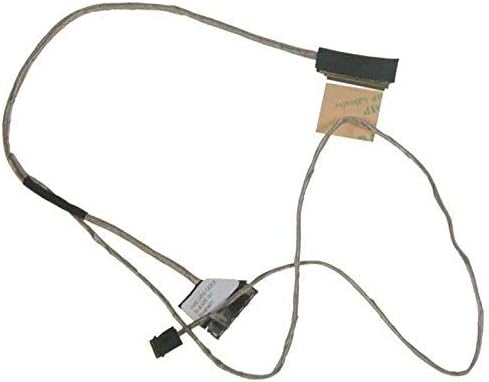
LVDS LCD LED Flex Video Screen Cable for Dell Inspiron 14z 5423 50.4UV05.101 P/N: 04MYD7
Item #:
182190809
MVR 272
Price Details
Excluding Shipping & Custom charges ( Shipping and custom charges will be calculated on checkout )
*All items will import from US
0 ratings
Write a review
In stock
 Imported from USA store
QTY:
Order now and get it around Saturday, August 01
Secured transaction
Ubuy works hard to protect your security and privacy. Our advanced payment security system ensures confidentiality by encrypting your information during transmission using AES (Advanced Encryption Standards) and SSL (Secure Socket Layer) protocols. Your payment details are 100% secure as we do not share your payment details with third party sellers.
Our Top Logistics Partners


Each item has been checked and is in 100% good condition before shipping.

Fast
Shipping

Free
Return*

Secure Packaging

100% Original Products

PCI DSS Compliance

ISO 27001 Certified


Note: Step Down Voltage Transformer required for using electronics products of US store (110-120). Recommended power converters Buy Now.


What Stands Out
High Compatibility
Designed specifically for Dell Inspiron 14z 5423 laptops, ensuring seamless integration and optimal performance without compatibility issues.
Durable Construction
Built with high-quality materials, this cable offers excellent durability and resistance to wear, guaranteeing a long-lasting solution for video display needs.
Easy Installation
Features a user-friendly design that simplifies the installation process, allowing for quick replacements with minimal technical expertise required, enhancing user convenience.
Product Details
- Each item has been checked and in 100% good condition before shipping
- New Replacement LCD FLex Cable
- 1 x LCD FLex Cable
- Compatible Models for Dell Inspiron 14z 5423
- 50.4UV05.101 P/N: 04MYD7
| Connector Type | Lvds to Micro Usb |
| Compatible Devices | Laptop |
| Compatible Phone Models | Dell Inspiron 14z 5423 |
| Connector Gender | Male-to-Female |
| Number of Pins | 40 |
| Recommended Uses For Product | Video Transmission |
| Indoor Outdoor Usage | Indoor |
| Unit Count | 1.0 Count |
| Brand Name | WEIMEI |
| Model | 50.4UV05.101 |
| Manufacturer | WEIMEI |
| Part Number | P/N: 04MYD7 |
| Item Shape | Round |
| Brand | WEIMEI |
| Item Weight | 0.1 lbs (50 grams) |
Who Should Buy?

-
DIY Laptop Repairs
Ideal for users skilled in DIY repairs looking to replace the screen cable in their Dell Inspiron 14z.
-
Cost-Conscious Consumers
Great choice for budget-conscious users needing an affordable yet effective solution for screen connectivity issues.
-
Frequent Travelers
Beneficial for users needing a reliable laptop component while on the go, ensuring screen functionality during travel.

-
Non-Dell Laptop Owners
Not suitable for users with laptops other than Dell Inspiron 14z, due to compatibility issues.
-
Novice Users
Not recommended for inexperienced users who may struggle with installation and troubleshooting procedures.
-
High-Performance Gamers
May not meet the standards of gamers needing high-definition displays and advanced video output capabilities.
Product Description
Have any Query? Chat with us
Customer Questions & Answers
-
Question:
What is an LVDS LCD LED Flex Video Screen Cable?
Answer: An LVDS LCD LED Flex Video Screen Cable is a specific type of cable used to connect the internal display of a laptop to the graphics card. This cable transmits video signals efficiently, thanks to its Low-Voltage Differential Signaling (LVDS) technology. It is designed to support high-resolution images, enhancing your viewing experience. In practical use, if your Dell Inspiron 14z 5423 is experiencing display issues or a black screen, replacing the cable with a new LVDS cable can often resolve these problems. -
Question:
How do I install the LVDS LCD LED Flex Video Screen Cable?
Answer: Installing the LVDS LCD LED Flex Video Screen Cable involves a few careful steps. First, ensure that your laptop is turned off and disconnected from any power source. Open the laptop casing to access the display and locate the old cable. Carefully detach it and attach the new cable in its place, ensuring a secure connection. Reassemble the laptop and power it on to check functionality. This process can restore connection issues or improve the display quality of your Dell Inspiron 14z 5423, making it work like new again. -
Question:
What are the signs that my LVDS cable needs replacing?
Answer: If you notice flickering images, color distortion, or the laptop screen remaining blank despite being turned on, these could be signs that your LVDS cable may need replacing. Additionally, physical damage to the cable such as fraying or kinks can affect performance. For the Dell Inspiron 14z 5423, promptly replacing the LVDS cable can help preserve the integrity of your display and improve overall functionality. -
Question:
Is the LVDS LCD LED Flex Video Screen Cable compatible with other Dell models?
Answer: The LVDS LCD LED Flex Video Screen Cable in question is specifically designed for the Dell Inspiron 14z 5423 model and utilizes a unique configuration to ensure optimal performance. While similar cables may exist for other models, compatibility is crucial; using an incorrect cable can lead to display issues. Always check the part number and specifications before purchasing or replacing. Ensuring compatibility will save you from potential headaches and will guarantee a seamless connection. -
Question:
Can I use a third-party LVDS cable for my Dell Inspiron 14z 5423?
Answer: While some third-party LVDS cables might fit and function, it is recommended to opt for OEM (Original Equipment Manufacturer) replacements for the Dell Inspiron 14z 5423. OEM cables, such as the one with the part number 04MYD7, are designed to meet the specific electrical and physical specifications required by your laptop, ensuring maximum compatibility and performance. Using a non-OEM cable may lead to issues such as signal loss or insufficient power to the display. -
Question:
What is the length of the LVDS LCD LED Flex Video Screen Cable?
Answer: The LVDS LCD LED Flex Video Screen Cable for the Dell Inspiron 14z 5423 usually features a standard length that accommodates the layout of the laptop. Typically, the length is sufficient to connect the display from the motherboard without being overly long, which can cause tangling or damage. If you encounter issues related to cable length, ensure you are using the recommended part, such as the 04MYD7, to maintain a tidy and efficient setup. -
Question:
Where can I buy LVDS LCD LED Flex Video Screen Cable for Dell Inspiron 14z 5423?
Answer: You can buy the LVDS LCD LED Flex Video Screen Cable for Dell Inspiron 14z 5423 through Ubuy, a reliable e-commerce platform that provides access to genuine accessories and parts. Ubuy offers a user-friendly online shopping experience, where you can easily search for the product by its part number (04MYD7) and ensure you are getting the correct cable for your laptop. This ensures you are investing in a quality product tailored for your device. -
Question:
What should I do if my replacement LVDS cable does not fix the screen issue?
Answer: If replacing the LVDS cable does not resolve the screen issue on your Dell Inspiron 14z 5423, you may need to consider other potential problems. These could include issues with the display itself, the motherboard, or the graphics card. It's advisable to perform a thorough diagnosis or consult with a professional technician to identify the root cause. Sometimes, the issue may lie in software settings or the operating system, so checking those can also be beneficial. -
Question:
Can incorrect installation of the LVDS cable damage my laptop?
Answer: Yes, incorrect installation of the LVDS cable can potentially lead to further damage to your laptop. If connections are not secure or if the cable is pinned improperly, it could result in short-circuits or even damage to the graphics card and motherboard. It's essential to follow installation instructions carefully and, if unsure, seek the help of a professional technician to ensure everything is connected safely. -
Question:
What materials are commonly used in making LVDS cables?
Answer: LVDS cables are typically made from high-quality materials designed to reduce electromagnetic interference and ensure clear signal transmission. These include copper conductors for efficient power flow, along with insulating materials to protect against external interference. The cables are often shielded to prevent signal degradation over longer distances. For your Dell Inspiron 14z 5423, these materials ensure that you receive optimal performance and a high-quality visual output on your laptop screen.
WEIMEI Laptop Replacement Parts Editorial Review
No editorial reviews found
Customer Reviews & Ratings
1 customers ratings
-
5 Star
100%
-
4 Star
0%
-
3 Star
0%
-
2 Star
0%
-
1 Star
0%
Review this product
Share your thoughts with other customers
Product Price History
Important information
- Limitations : For products shipped internationally, please note that any manufacturer warranty may not be valid; manufacturer service options may not be available; product manuals, instructions, and safety warnings may not be in destination country languages; the products (and accompanying materials) may not be designed in accordance with destination country standards, specifications, and labeling requirements; and the products may not conform to destination country voltage and other electrical standards (requiring use of an adapter or converter if appropriate). The recipient is responsible for assuring that the product can be lawfully imported to the destination country. When ordering from Ubuy or its affiliates, the recipient is the importer of record and must comply with all laws and regulations of the destination country.
- Not all the products listed on Ubuy are for sale, as Ubuy is a global search engine. Products are subject to export/trade regulations.
MVR 272
Order now and get it around Saturday, August 01
This item is not restrict in my country.(Please click on above link if this item is not restrict in your country, So our team will review and allow.)
QTY:
Secured transaction
Ubuy works hard to protect your security and privacy. Our advanced payment security system ensures confidentiality by encrypting your information during transmission using AES (Advanced Encryption Standards) and SSL (Secure Socket Layer) protocols. Your payment details are 100% secure as we do not share your payment details with third party sellers.
Our Top Logistics Partners
Fastest cross-border delivery
Features & Benefits
- New and replacement LCD Flex Cable for Dell Inspiron 14z 5423.
- Guaranteed 100% good condition before shipping.
- Compatible with specific models: Dell Inspiron 14z 5423.
- Part number: 50.4UV05.101 P/N: 04MYD7.
- Ideal solution for LCD connectivity issues.
- Easy installation for hassle-free use.