- Home Page /
- Electronics /
- Computer Accessories /
- Computer Accessories & Peripherals /
- Input Devices /
- Graphics Tablets /
- Artisul SP1603 15.6 Inch Graphics Drawing Tab...
0 ratings




Item #:
56269241
Artisul SP1603 15.6 Inch Graphics Drawing Tablet with Screen Full-Laminated Drawing Pen Display Drawing Monitor Compatible with Windows, macOS, and
Item #:
56269241
MVR 4746
Price Details
Excluding Shipping & Custom charges ( Shipping and custom charges will be calculated on checkout )
*All items will import from US
In stock
 Imported from USA store
QTY:
Only 10 items left in stock.
Order now and get it around Sunday, June 28
Secured transaction
Ubuy works hard to protect your security and privacy. Our advanced payment security system ensures confidentiality by encrypting your information during transmission using AES (Advanced Encryption Standards) and SSL (Secure Socket Layer) protocols. Your payment details are 100% secure as we do not share your payment details with third party sellers.
Our Top Logistics Partners


SP1603 drawing tablet adopts full-laminated tempered glass display. Seamless laminate between touch screen and display, reducing light loss caused by air layers while increasing precise cursor positioning, which makes your art clearer and brighter.

Fast
Shipping

Free
Return*

Secure Packaging

100% Original Products

PCI DSS Compliance

ISO 27001 Certified


Note: Step Down Voltage Transformer required for using electronics products of US store (110-120). Recommended power converters Buy Now.


What Stands Out
Full-Laminated Display
Experience enhanced touch sensitivity and natural drawing with the full-laminated screen, eliminating parallax and providing a more accurate drawing experience for artists and designers.
High Pressure Sensitivity
With 8192 levels of pressure sensitivity, the tablet allows for precision control over brush strokes, enabling artists to create intricate details effortlessly across various applications and platforms.
Wide Compatibility
Seamlessly compatible with Windows, macOS, and Android systems, this drawing tablet caters to diverse user preferences, making it a versatile choice for professional and amateur artists alike.
Product Details
- Full-Laminated Screen Design: The SP1603 drawing tablet adopts full-laminated tempered glass display. Seamless laminate between touch screen and display, reducing light loss caused by air layers while increasing precise cursor positioning, which makes your art clearer and brighter
- Upgraded Pen Technology: P77 battery-free stylus adopts new pressure-sensitive pen technology, which shortens the distance from the pen tip to the display for a precise line positioning to achieve the effect of real pen writing. Features 8192 pressure sensitivity, support ±60° tilt, and 5080LPI handwriting resolution. The ergonomic gravity balance design gives users a professional and comfortable feel, you can easily get smooth and accurate lines
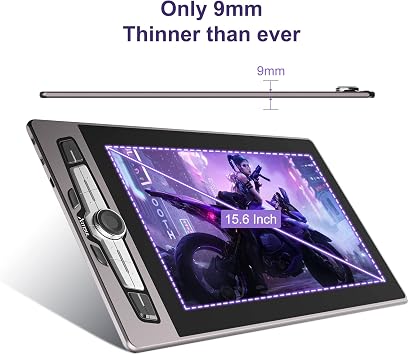
- Larger Size&High Color Gamut: SP1603 pen display has a large screen and 15.6-inch drawing area. Only 9mm Ultra Thin Aluminum Body, which is slim and easy to carry. Superb color accuracy of 90% NTSC(128% sRGB), 178° full viewing angle, and 1920x1080 HD resolution making colors more rich and vivid. Applied with anti-glare film can reduce glare, resist scratch and provide paper texture
- More Efficiently for Creation: Up to 14 customizable shortcut keys and a dial let you do everything faster and more efficiently. The silver metallic paint and irregular design on the shortcut keys deliver a responsive and comfortable experience. Decreasing the mess of cables by connecting with a full-featured USB Type C 3.1 Gen2 Cable (not included), or HDMI & 2 in 1 cable (Type-C to USB-A+USB-A), or connect to the phone with Type-C port
- Warmly note: The SP1603 drawing tablet is NOT A STAND ALONE TABLET! It must be connected to a PC computer or a laptop
| Brand | Artisul |
| Model Name | Artisul SP1603 |
| Built-In Media | SP1603 Pen Display,P77 Digital Pen,Pen Case,Pen Stand,Pen Nib,Adjustable Stand,Mini HDMI Cable,2-in-1 USB-C Cable,Adapter,Quick Guide |
| Target Audience | Creators, artists, illustrator, Student, Teacher, ... |
| Model Number | Artisul SP1603 |
| Manufacturer | Artisul |
| Mfr Part Number | SP1603 |
| Item Type Name | Drawing Tablet with Screen, Pen Display, Drawing Tablet with Monitor, Graphics Tablet |
| Color | SP1603-15.6inch (407201.6 cm) |
| Connectivity Technology | HDMI, USB, USB- C( USB3.1 Gen1, DP1.2) |
| Pressure Sensitivity | 8192 Levels |
| Operating System | Windows 7/8/8.1/10/11 or later, MAC 10.12 or later, Android 6.0 or later(USB3.1Gen2 DP1.2) |
| Additional Features | Dail Controller, 60° Tilt Support, 128% sRGB, Extra-Slim, Full Lamination, 14 Shortcut Keys |
| Specific Uses For Product | Drawing, 3D Modelling, Animation, Designing, E-Signature, Editing, Online Education, Painting, Remote Work, Teaching, Writing, etc |
| Compatible Devices | Compatible with Windows, macOS, and Android |
| Display Type | LCD |
| Native Resolution | 1920x1080 |
| Screen Size | 15.6 Inches (39.6 cm) |
| Item Weight | 3 Pounds (1.36 kg) |
| Item Dimensions L x W | 18"L x 10.1"W (45.7 cm) |
| Active Surface Area | 15.6 inch (39.6 cm) |
| Special Feature | Dail Controller, 60° Tilt Support, 128% sRGB, Extra-Slim, Full Lamination, 14 Shortcut Keys |
What's in the box
SP1603 Pen Display,P77 Digital Pen,Pen Case,Pen Stand,Pen Nib,Adjustable Stand,Mini HDMI Cable,2-in-1 USB-C Cable,Adapter,Quick Guide
Who Should Buy?

-
Digital Artists
Ideal for digital artists looking for a responsive, high-quality drawing experience with excellent color accuracy.
-
Students and Learners
Great for students pursuing art or design studies, providing practical hands-on experience with digital drawing technology.
-
Graphic Designers
Perfect for graphic designers needing precise pressure sensitivity and color performance for professional projects.

-
Casual Users
Not suitable for casual users or hobbyists who may find it too advanced or expensive for their needs.
-
Travel Artists
Less ideal for artists who frequently travel due to its size and need for a stable workspace.
-
Budget-Conscious Buyers
May not meet expectations for those strictly limited by budget, as it falls into a higher price category.
Product Description
Have any Query? Chat with us
Customer Questions & Answers
-
Question:
What are the key features of the Artisul SP1603 graphics drawing tablet?
Answer: The Artisul SP1603 features a 15.6-inch full-laminated display offering vibrant colors and clarity, making it an excellent choice for artists. It comes with a pressure-sensitive drawing pen that provides a natural writing and drawing experience. Additionally, it is compatible with both Windows and macOS systems, ensuring versatility for different users. This tablet is perfect for digital artists who need a portable yet powerful device for sketching, illustrating, or photo editing. -
Question:
Is the Artisul SP1603 compatible with popular design software?
Answer: Yes, the Artisul SP1603 is compatible with various popular design software such as Adobe Photoshop, Illustrator, CorelDRAW, and more. This compatibility ensures that artists can utilize the tablet efficiently with their preferred tools for drawing and design. Being able to use established software enhances artists' workflow, making it ideal for graphic design, digital painting, and animation tasks. -
Question:
How does the pressure sensitivity of the drawing pen work?
Answer: The drawing pen for the Artisul SP1603 offers up to 8192 levels of pressure sensitivity, allowing artists to create lines of varying thickness and opacity depending on how hard they press. This is crucial for detailed artwork, as it enables finer control and nuances in strokes. The responsiveness of the pen contributes to a realistic drawing experience, simulating traditional pencil or brush techniques. -
Question:
What are the benefits of the full-laminated display?
Answer: The full-laminated display on the Artisul SP1603 reduces parallax, making the drawing experience more intuitive. This means that the cursor on the screen is more accurately aligned with the pen, which minimizes any offset feel while drawing. Additionally, the laminated screen often leads to improved color accuracy and brightness, thereby enhancing the overall visual experience for digital artists. -
Question:
Can I use the Artisul SP1603 with Linux systems?
Answer: While the Artisul SP1603 is designed for compatibility with Windows and macOS, users have reported mixed results when trying to use it with Linux systems. It may be possible with specific drivers, but official support is not guaranteed. Artists working in Linux environments should consider checking community forums or guides for potential workaround solutions if they prefer using open-source systems. -
Question:
What types of artists would benefit from using the Artisul SP1603?
Answer: The Artisul SP1603 is suited for a variety of artists, including illustrators, graphic designers, and animators. Its portability makes it ideal for professional artists who travel as well as hobbyists seeking an affordable yet powerful drawing tablet. Additionally, students studying art and design can greatly benefit from its features, helping them develop their skills effectively in a digital format. -
Question:
How do I connect the Artisul SP1603 to my computer?
Answer: Connecting the Artisul SP1603 to your computer is straightforward. Simply plug the tablet into your PC or Mac using the provided USB-C cable. Once connected, install the necessary drivers from the Artisul website to ensure full functionality. This quick setup process allows you to start using the tablet within minutes, making it convenient for both new and experienced users alike. -
Question:
Is there any additional software included with the Artisul SP1603?
Answer: The Artisul SP1603 typically comes with a basic suite of software or software recommendations suitable for digital art and design. While specific software bundles may vary, artists are encouraged to explore additional tools for enhanced functionalities. This practice allows users to maximize their creativity on the tablet, making it suitable for various art styles and projects. -
Question:
What maintenance is required for the Artisul SP1603?
Answer: Maintaining the Artisul SP1603 involves regular cleaning of the screen with a microfiber cloth to prevent smudges and scratches. Additionally, ensure the drivers are updated periodically for optimal performance. This basic care keeps your tablet in excellent condition, allowing artists to focus on their work without the distractions of technical issues. -
Question:
Where can I buy the Artisul SP1603 graphics drawing tablet in Maldives?
Answer: You can purchase the Artisul SP1603 graphics drawing tablet through Ubuy, which offers a variety of products including this graphics tablet. Ubuy provides the convenience of online shopping, ensuring a smooth purchasing process while delivering quality products to your doorstep in Maldives.
Artisul Graphics Tablets Artisul SP1603 Editorial Review


The Artisul SP1603 is a 15.6 inch graphics drawing tablet with a screen and full-laminated drawing pen display. It is compatible with Windows, macOS, and Android and has 8192 pressure sensitivity and 128% sRGB color space. The device works with an adapter that supports input from wall outlet of 110V-240V 50/60Hz. The Artisul SP1603 is a budget-friendly alternative to higher-end graphics tablets. The packaging feels premium despite the low price and comes with included items such as USB cables, a mini to standard HDMI cable, power adapter, drawing glove, pen holder and plenty of tips. The device comes with configurable buttons that can be used as shortcuts as they are literally keybound. Users can rotate the display in the Artisul software, which is helpful for lefties. The tablet is compatible with widely-used graphics software such as Photoshop, MSPaint, and Substance Painter. However, users should be aware of a few minor inconveniences with the device such as shorter cables, and the need for an adapter with ends for any region you will be in that is not native to the purchase location. The pen also lacks the eraser end that other tablets have. The software does not properly handle window scaling, and the display brightness is reset each time the PC reboots. Overall, the Artisul SP1603 tablet is an excellent choice for artists looking for a high-quality yet affordable alternative to higher-end graphics tablets.
Customer Reviews & Ratings
218 customers ratings
-
5 Star
65%
-
4 Star
17%
-
3 Star
7%
-
2 Star
2%
-
1 Star
9%
Review this product
Share your thoughts with other customers
Pros
- Budget-friendly
- Comparable against high-end graphic tablets
- Configurable buttons for shortcuts
- Full-laminated drawing screen provides a smooth and natural drawing experience
Cons
- Shorter cables
Product Price History
Important information
- Limitations : For products shipped internationally, please note that any manufacturer warranty may not be valid; manufacturer service options may not be available; product manuals, instructions, and safety warnings may not be in destination country languages; the products (and accompanying materials) may not be designed in accordance with destination country standards, specifications, and labeling requirements; and the products may not conform to destination country voltage and other electrical standards (requiring use of an adapter or converter if appropriate). The recipient is responsible for assuring that the product can be lawfully imported to the destination country. When ordering from Ubuy or its affiliates, the recipient is the importer of record and must comply with all laws and regulations of the destination country.
- Not all the products listed on Ubuy are for sale, as Ubuy is a global search engine. Products are subject to export/trade regulations.
MVR 4746
Order now and get it around Sunday, June 28
This item is not restrict in my country.(Please click on above link if this item is not restrict in your country, So our team will review and allow.)
QTY:
Only 10 items left in stock.
Secured transaction
Ubuy works hard to protect your security and privacy. Our advanced payment security system ensures confidentiality by encrypting your information during transmission using AES (Advanced Encryption Standards) and SSL (Secure Socket Layer) protocols. Your payment details are 100% secure as we do not share your payment details with third party sellers.
Our Top Logistics Partners
Fastest cross-border delivery
Features & Benefits
- Full-laminated tempered glass display
- Reduces light loss and increases precise cursor positioning
- Art is clearer and brighter
- Upgraded Pen Technology with 8192 pressure sensitivity
- Larger size and high color gamut for a better drawing experience
- 14 customizable shortcut keys and a dial for efficient creation