- Home Page /
- Electronics /
- Computer Accessories /
- Computer Accessories & Peripherals /
- Input Devices /
- Graphics Tablets /
- Wacom Cintiq 16 Drawing Tablet with Screen, 1...
0 ratings






Item #:
220638060
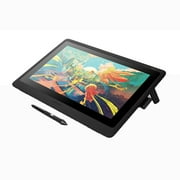
Wacom Cintiq 16 Drawing Tablet with Screen, 16 inch Display, Pro Pen 3 (Battery-Free), 100% sRGB Pen Display for Artists, Designers, Animation, Game
88% of respondents would recommend this to a friend
Item #:
220638060
MVR 13744
Price Details
Excluding Shipping & Custom charges ( Shipping and custom charges will be calculated on checkout )
*All items will import from US
In stock
 Imported from USA store
QTY:
Order now and get it around Tuesday, July 28
Secured transaction
Ubuy works hard to protect your security and privacy. Our advanced payment security system ensures confidentiality by encrypting your information during transmission using AES (Advanced Encryption Standards) and SSL (Secure Socket Layer) protocols. Your payment details are 100% secure as we do not share your payment details with third party sellers.
Our Top Logistics Partners


Experience true-to-life colors with rich gradients and nuanced shading that bring your digital artwork to life.

Fast
Shipping

Free
Return*

Secure Packaging

100% Original Products

PCI DSS Compliance

ISO 27001 Certified


Note: Step Down Voltage Transformer required for using electronics products of US store (110-120). Recommended power converters Buy Now.


What Stands Out
High-Resolution Display
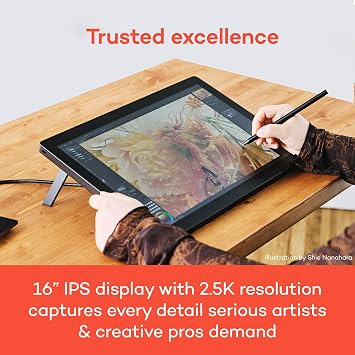
The 16-inch screen offers a vibrant 100% sRGB color space, ensuring artists and designers have precise and lifelike colors for their creative projects.
Battery-Free Pen
The Pro Pen 3 eliminates the need for batteries, providing endless creativity without interruptions, allowing artists to focus solely on their work.
Cross-Platform Compatibility
Effortlessly connects with both Mac and PC systems, making it an ideal choice for versatile professionals in animation, game development, and design.
Product Details
- IMMERSIVE CREATIVE CANVAS: 16" IPS display with 2.5K WQXGA resolution (2560 x 1600) delivers sharp, crisp, detailed visuals for digital art and design
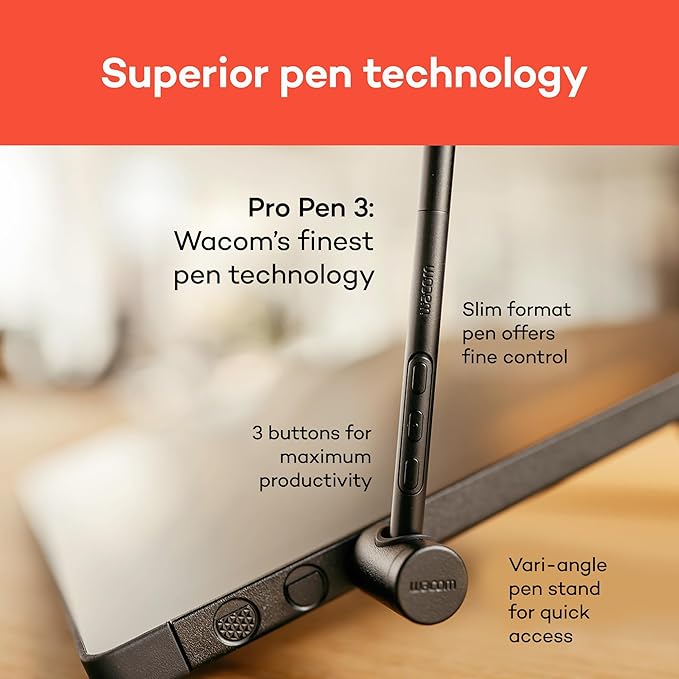
- WACOM’S BEST PEN TECHNOLOGY: Pro Pen 3 with 8192 pressure levels responds to your lightest touch; includes tilt support, 3 shortcut keys for tool access, and a holder that mounts to either side of the display with adjustable angle for quick access
- CINEMATIC COLOR DISPLAY: 99% DCI-P3 and 100% sRGB coverage with 8-bit color depth delivers the wide color gamut used in modern displays and digital media - see your artwork as it's meant to be viewed
- READY TO CREATE: Built-in fold-out legs provide a 20-degree working angle or purchase adjustable stand for personalized comfort
- CONNECTION: includes USB-C cable to connect to Windows/Mac computers with DisplayPort Alt Mode or Thunderbolt 3 or 4 input (computers without DP Alt or TB 3 or 4 input require additional cables)
| Brand | Wacom |
| Model Name | Wacom Cintiq 16 |
| Built-In Media | AC Adapter, Two USB-C to C Cables, Wacom Pro Pen 3, built in fold out legs |
| Target Audience | 3D CAD, Designer, Digital Artists |
| Model Number | DTK168K0A |
| Manufacturer | Wacom Technology Corporation |
| UPC | 753218984081 |
| Mfr Part Number | DTK168K0A |
| Unit Count | 1.0 Count |
| Connectivity Technology | USB-C cable to connect to Windows/Mac computers with DisplayPort Alt Mode or Thunderbolt 3 or 4 input (computers without DP Alt or TB 3 or 4 input require additional cables) |
| Pressure Sensitivity | 8192 Levels |
| Operating System | Android 8.0 and above, Windows 10 or later, macOS 13 or later |
| Additional Features | 16" IPS LCD, 60° Tilt Support, 8-bit color depth, Anti-Glare Glass, built in fold out legs |
| Specific Uses For Product | 3D Modelling, Animation, Designing |
| Compatible Devices | Mac /PC |
| Display Type | LCD |
| Native Resolution | 2560x1600 |
| Screen Size | 16 Inches (40.6 cm) |
| Item Weight | 4.5 Pounds (2.04 kg) |
| Item Dimensions L x W | 15.1"L x 10.2"W (38.4 cm) |
| Active Surface Area | 13.6 x 8.5 inches (34.5 cm) |
| Color | Black |
| Connectivity Technology | USB-C cable to connect to Windows/Mac computers with DisplayPort Alt Mode or Thunderbolt 3 or 4 input (computers without DP Alt or TB 3 or 4 input require additional cables) See more |
| Special Feature | 16" IPS LCD, 60° Tilt Support, 8-bit color depth, Anti-Glare Glass, built in fold out legs |
Dangerous Goods
To avoid the delay in customs clearance process for Dangerous Goods, the shipment shall be opened at our warehouse facility to check the severity of hazardous components. Please see the list of Dangerous goods here.
What's in the box
Wacom Pro Pen 3
built in fold out legs
Two USB-C to C Cables
AC Adapter
Who Should Buy?

-
Professional Artists
Ideal for professional artists needing precise and responsive drawing capabilities on a high-quality display.
-
Graphic Designers
Perfect for graphic designers looking for an intuitive interface to enhance their creative workflows.
-
Animation Creators
Beneficial for animation developers requiring a tablet that supports detailed and intricate animation projects.

-
Casual Users
Not suitable for casual users who only engage in light sketching or infrequent digital art creation.
Product Description
Have any Query? Chat with us
Related Searches
Customer Questions & Answers
-
Question:
What are the key features of the Wacom Cintiq 22 Drawing Tablet?
Answer: The Wacom Cintiq 22 features a 21.5-inch Full HD display, providing vivid colors and sharp images for graphic design and animation. It includes the Pro Pen 2, which offers 8,192 levels of pressure sensitivity and tilt response, ensuring precision when creating artwork. This tablet also supports multi-touch functionality, allowing for intuitive gestures. Artists and designers can use it for various applications, including digital art, animation, and photo editing, making it an ideal tool for both professionals and hobbyists. -
Question:
How does the Pro Pen 2 enhance the drawing experience?
Answer: The Pro Pen 2 is designed to offer an incredibly natural drawing experience. With 8,192 levels of pressure sensitivity and tilt recognition, it closely mimics the feel of traditional media. This precision allows you to create fine lines or bold strokes effortlessly. Whether you're working on detailed illustrations or quick sketches, the Pro Pen 2 empowers artists with the tools needed to bring their visions to life, making it indispensable for graphic designers and animators. -
Question:
Can I connect the Wacom Cintiq 22 to my laptop or desktop?
Answer: Yes, the Wacom Cintiq 22 can be easily connected to both laptops and desktops using USB and HDMI connections. Once connected, the tablet functions as a second screen that mirrors your computer's display, allowing you to draw directly on the screen. This setup is particularly beneficial for illustrators and graphic designers, as it enhances workflow and creativity by allowing real-time drawing using your computer's software. -
Question:
What types of software are compatible with the Wacom Cintiq 22?
Answer: The Wacom Cintiq 22 is compatible with a wide range of graphic design and animation software, including Adobe Photoshop, Corel Painter, Clip Studio Paint, and Autodesk SketchBook. This versatility makes it suitable for artists in various fields, from digital painting to 3D modeling. Users can seamlessly integrate their preferred applications with the tablet, ensuring a smooth workflow tailored to individual creative needs. -
Question:
Is the Wacom Cintiq 22 suited for beginners?
Answer: Absolutely! The Wacom Cintiq 22 is user-friendly and ideal for beginners venturing into digital art. Its included Pro Pen 2 offers sensitivity and precision that helps newbies develop their skills. Additionally, the large screen space allows for ease of navigation and creativity without feeling cramped. Beginners can practice drawing, design, and animation in a comfortable environment, making it a strong choice for those just starting their artistic journey. -
Question:
What is the resolution of the Wacom Cintiq 22 display?
Answer: The Wacom Cintiq 22 features a resolution of 1920 x 1080 Full HD, ensuring crisp and vibrant visuals. This high-definition display is crucial for artists who require accuracy in color and detail. With a wide viewing angle and good color reproduction, you can expect your artwork to look great on-screen, which is especially important for graphic design and animation projects that demand perfection. -
Question:
What are the advantages of using a drawing tablet like Wacom Cintiq 22?
Answer: Using a drawing tablet like the Wacom Cintiq 22 offers numerous advantages over traditional drawing methods. Digital portability allows you to create anywhere, while the ease of making edits enhances creativity. The integration with various graphic software increases efficiency. Artists can experiment with different styles without the cost of physical materials, making it financially feasible for those engaging in frequent design projects or collaborations. -
Question:
Does the Wacom Cintiq 22 support multi-touch gestures?
Answer: Yes, the Wacom Cintiq 22 features multi-touch support, allowing you to navigate your creative space with simple gestures such as zooming, rotating, and panning. This functionality helps streamline your workflow and enables a more intuitive interaction with your artwork. Artists can focus on creativity rather than navigating menus, making the drawing experience far more fluid and enjoyable. -
Question:
What is the ideal workspace setup for using the Wacom Cintiq 22?
Answer: For the best experience with the Wacom Cintiq 22, it’s recommended to have a dedicated workspace with ample light and an ergonomic chair. The tablet should be positioned at eye level to reduce strain while drawing. Ensure that your computer is within reach, as you'll frequently need to access software settings. This setup creates a comfortable environment that enhances productivity, allowing you to focus on your creative tasks without distractions. -
Question:
Where can I buy Wacom Cintiq 22 Drawing Tablet with Screen in Maldives?
Answer: You can conveniently purchase the Wacom Cintiq 22 Drawing Tablet with Screen from Ubuy in Maldives. Ubuy offers a wide selection of Wacom products and ensures a seamless shopping experience. Whether you're a professional artist or a hobbyist looking to elevate your digital drawing, Ubuy is the destination for your Wacom needs.
Wacom Graphics Tablets DTK168K0A Editorial Review
No editorial reviews found
Customer Reviews & Ratings
685 customers ratings
-
5 Star
77%
-
4 Star
11%
-
3 Star
3%
-
2 Star
3%
-
1 Star
6%
Review this product
Share your thoughts with other customers
Platform Trust & Buyer Confidence

MT
Mohd
Verified buyer
“The product received very good packaging & safe…Thank You”
16 June 2026 · via Trustpilot
SJ
Shawati
Verified buyer
“Accurate delivery timing given”
16 June 2026 · via Trustpilot
YB
Youcef
Verified buyer
“Not madly expensive like I thought, and much quicker than promised.”
15 June 2026 · via Trustpilot
LM
Leila
Verified buyer
“Never dealt with Ubuy before, but everything worked out great. Seamless cross border purchasing and shipping. Thanks!”
6/7/2026 · via Trustpilot
KA
Kwame
Verified buyer
“The process was smooth, with clear communication and timelines. This was my 1st purchase and I am really impressed. I will definitely be coming back.”
12 June 2026 · via Trustpilot
Secure Checkout
Global Delivery
Easy Returns
Genuine Products
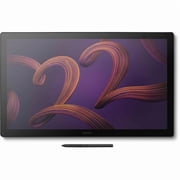
Top selling Wacom Cintiq 22 in Maldives






Last Updated on July 18, 2026
Product Price History
Important information
- Limitations : For products shipped internationally, please note that any manufacturer warranty may not be valid; manufacturer service options may not be available; product manuals, instructions, and safety warnings may not be in destination country languages; the products (and accompanying materials) may not be designed in accordance with destination country standards, specifications, and labeling requirements; and the products may not conform to destination country voltage and other electrical standards (requiring use of an adapter or converter if appropriate). The recipient is responsible for assuring that the product can be lawfully imported to the destination country. When ordering from Ubuy or its affiliates, the recipient is the importer of record and must comply with all laws and regulations of the destination country.
- Not all the products listed on Ubuy are for sale, as Ubuy is a global search engine. Products are subject to export/trade regulations.
MVR 13744
Order now and get it around Tuesday, July 28
This item is not restrict in my country.(Please click on above link if this item is not restrict in your country, So our team will review and allow.)
QTY:
Secured transaction
PCI DSS compliant and ISO 27001:2022 certified, with encrypted payments and full buyer protection on every order.
Our Top Logistics Partners
Fastest cross-border delivery
Features & Benefits
- Professional display tablet combining traditional drawing feel with digital precision.
- Cintiq 16 features a vibrant 2.5K resolution for stunning detail.
- Pro Pen 3 delivers 8,192 pressure levels for maximum control.
- Compact design balances ample workspace with portability.
- Anti-glare etched glass ensures precise cursor placement.
- Built-in angles and VESA mounts provide flexibility for creativity.
Ubuy Assurance
Experience worry-free shopping with 100% original products, PCI DSS-compliant payment security, ISO 27001-certified data protection, the fastest cross-border delivery, free returns *, and secure packaging on every order.